10 Best Hailuo Ai Alternatives for AI Videos Tech
Professional video creation used to take forever, including complex software, slow rendering, and limitless editing. If it sounds familiar to you, then you are in the right place. All the credit goes to Hailuo AI, which has made it now possible to change text or images into professional-looking videos in just a matter of minutes. But in case Hailuo AI is not the right fit for you, then read the list present in this blog post, which includes the best alternatives to Hailuo AI. Whether you are a marketer, creator, or team member, these tools will make you more intelligent and quicker at your job. Let us get started!
What is an AI Video Generator?
AI video technology is quickly reforming the digital content setting. When Artificial intelligence is combined with video production, creators can create high-quality videos with minimal time, effort, or technical knowledge. Instead of depending on traditional methods, where video production could take hours or even days, AI-powered platforms could change text, images, scripts, and even voice ideas into dynamic video content within minutes.
These tools use machine learning, natural language processing, and computer vision to automate editing, add transitions, sync voiceovers, generate avatars, and even produce multilingual versions, all without requiring professional videographers or editors. Artificial intelligence (AI) video solutions help close the gap between creativity and efficiency when creating explainer videos, marketing material, training modules, or social media clips.
As businesses and individuals look for quicker and more cost-efficient ways to engage visually, AI video generation is becoming an important part of contemporary content creation strategies.
AI Video Generator Market Size
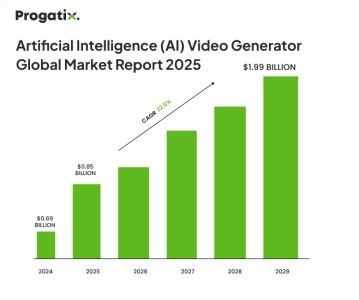
According to a report by The Business Research Company, the artificial intelligence (AI) video generator market size has grown rapidly in the past few years. It will develop from $0.69 billion in 2024 to $0.85 billion in 2025 at a compound annual growth rate (CAGR) of 22.9%. Short videos, the number of internet users, demand for social media advertising, and a need for high-quality video content are all factors contributing to the expansion during this historic period. The market for artificial intelligence (AI) video generators is expected to develop rapidly over the next several years, reaching $1.92 billion in 2029 at a compound annual growth rate (CAGR) of 22.6%.
Kling AI – Fast, Cost-Effective, and Great for Motion Control
Kling AI, supported by contemporary models like Kolors and Kling, is one of the rapidly growing AI video generators, renowned for its high frame consistency, realistic 3D character motion, and motion brush control. Gaining momentum among the creators globally, Kling AI makes it easier to bring bold ideas to the world, text-to-video or image-to-video, both. It enable creators to generate stylized, streamlined, or realistic animations with great detail, perfect for explainer videos, character storytelling, and cinematic content.
Key Features
- Rapidly transform text or images into high-quality videos via advanced AI models.
- Remix or reproduce others’ projects through a single click to experiment and innovate readily.
- Explore, collaborate, and get motivated by a worldwide network of creators and AI artists.
- Create striking visuals from simple prompts with potential generative tools.
- A budget-friendly alternative to out-of-date video production.
- Perfect for marketing, education, social media, and more.
Advantages
- Turn written prompts or images into professional 1080p videos.
- Easy to use with no editing skills or software required.
- Create longer videos with improved creativity and engagement.
- Delivers polished, professional-looking video outputs.
- Generate high-quality visuals in different styles and sizes from text or images.
- Regular updates bring new features and model improvements.
- Adjust video style and resolution to match your project needs.
- Create videos in minutes, saving significant time and effort.
Disadvantages
- For large prompts, it takes a slightly longer processing time.
- Fewer visual styles are available in contrast to some other platforms.
- Offers minimal tools for personalizing audio elements.
- Might cause glitches or unanticipated outcomes occasionally.
Price
Free Plan: Available
Premium: Starts at $79.20+
PixVerse AI
PixVerse is your imagination companion that changes normal images and videos into spectacular AI-generated content. To overlay funny effects over photos or produce fresh videos from text, this application makes your imagination real! It enables you to upload your videos, choose your style, and tap to apply. It supports rapid audio-video production, restyling of video, all in real-time now. Its revolutionary AI technology allows everyone to design professional-level visuals easily.
Key Features
- Turn static images into animated videos with AI effects.
- Apply famous art styles or mood-enhancing filters to your images.
- Use AI to remove backgrounds, adjust perspective, and enhance visuals.
- Quickly create engaging videos from simple text prompts.
- Edit multiple images simultaneously for efficient content production.
- Intuitive design makes it easy for users of all levels.
- Produce crisp, professional-quality visuals.
- Generate original images from text prompts with creative precision.
Advantages
- Rapidly preview and fine-tune your content as you create.
- Get smart recommendations to improve video quality and creativity.
- Tailor wide-ranging templates to align with your unique project needs.
- No advanced skills needed; suitable for all with step-by-step tutorials.
- Export crisp, professional-quality videos ready for social media and beyond.
Disadvantages
- It might take time to learn, given its feature-rich design.
- Long or intricate videos may take time to process.
- Results could vary and sometimes miss creative expectations.
- Lacks profundity for advanced video editors.
- Might need extra revisions due to unreliable output quality.
- It can slow down on older or low-spec devices.
Price
Free Plan: Available
Premium: Starts at $10+
Sora
An openAI’s innovative text-to-video AI model that could generate high-quality videos of a one-minute span or less based on a text description. Introduced in February 2024, Sora uses diffusion transformer technology to create realistic and imaginative scenes with thorough linguistic and physical intelligence. It can generate several shots within a single video while keeping visual and character continuity. Sora has uses in a number of industries, including film production, marketing, and education, providing a one-stop solution for content creators who need effective video creation solutions.
Key Features
- Strong emphasis on making detailed characters and scenes.
- Offers ready-made templates for quick video storytelling.
- Comprehends and responds to prompts in numerous languages.
Advantages
- Make high-quality, high-definition videos.
- Supports diverse camera angles for dynamic visuals.
- Generates natural and realistic character animations.
Disadvantages
- More compatible with realistic styles than for extremely detailed images.
Price:
Free plan: Available
Premium: Starts at $20+
Launch Your AI Video Builder Like Sora
Let's Connect
Runway
A video editing AI software platform that looks at turbocharging collaboration and next-gen AI effects in real time. Next-gen AI models drive it, making creators more in control, flexible, and expressive during video creation. Creators get Gen-3 Alpha, its flagship store, which generates hyper-real and completely editable videos from plain text input, making high-end video creation as effortless as it possibly could be.
Key Features
- Change text prompts into engaging video clips with advanced AI generation.
- Access a collection of AI tools for tasks such as background removal, subtitle creation, and image animation.
- Remove undesirable objects or elements from videos effortlessly.
- Easily replace video backgrounds for artistic compound shots.
- Create simplified slow-motion effects by crafting in-between frames.
Advantages
- Easy-to-navigate design that suits users of all experience levels.
- Offers advanced tools such as text-to-video, inpainting, and green screen.
- Enables teams to work in collaboration on creative projects in real time.
- Frequently adds new features and enhances existing ones.
- An engaged user base for sharing, learning, and getting encouraged.
- Perfect for creating visually rich, motion-based content.
- Particularly useful for filmmakers, editors, and content creators.
- Easily execute artistic styles and smart visual improvements.
Disadvantages
- Certain tools might take time to master.
- May need potential hardware for smooth performance.
- Usage restrictions could limit results on lower plans.
- New users can find some tools overpowering.
- Advanced features are only available with premium plans.
- Depends profoundly on reliable internet for best performance.
Price
Free plan: Available
Premium: Starts at $15+
Luma AI
An easy-to-use AI video creator that requires no technical skills to begin creating. Given its user-friendly interface and minimal design, it is easy to navigate. Through step-by-step guides, tips, and tutorials, it enables users to get maximum value from the tools. Its tools are quite adaptable in their usage and enable text, video, and image editing to help transform several creative concepts into reality.
Key Features
- Create thorough 3D models using your smartphone and AI-driven reconstruction.
- Create ultra-realistic 3D scenes with advanced lighting and detail.
- Edit lighting, backgrounds, and materials through user-friendly tools easily.
- Export 3D assets in several formats for use in other platforms and tools.
- Extract and engage with NeRF-based 3D scenes directly in Unreal Engine.
Advantages
- Capture products in lifelike 3D with stunning detail.
- Create realistic spaces using NeRF technology for virtual tours and visualization.
- Capture objects using just a smartphone—no special gear needed.
- Edit lighting, background, and materials directly within the app.
- Export 3D assets in formats like USDZ, glTF, and OBJ.
- Simple, intuitive UI for users of all skill levels.
Disadvantages
- The free version offers only basic features.
- Premium plans might be pricey for some users.
- Needs a high-performance device for streamlined operation.
- It takes time to completely master all tools and competencies.
Price
Free plan: Available
Premium: Starts at $9.99+
Hunyuan
Hunyuan AI is a new, innovative AI video generator that creates high-quality video from text descriptions. It is equipped with 13B parameters, has first-rate performance, and is the most capable open-source video generation model now available. Hunyuan AI video is an innovative accomplishment in the AI video creation with a huge video generation capability. This AI model supports resolutions of up to 720p x 1280p, leading to high-quality images. It’s a perfect solution for creating professional-grade content, artwork, or commercials with a Hollywood movie-like quality.
Key Features
- Turn written prompts into AI-generated videos instantly.
- Constantly evolving with community-driven updates and customization.
- Produces cinematic videos with stable motion and realistic visuals.
- Offers smooth transitions and lifelike scenes suitable for professional use.
- Designed for commercial use in advertising, film, and marketing.
Advantages
- Free trials allow you to test Hunyuan Video with no upfront cost.
- The open-source nature promotes constant enhancement and community support.
- The text-to-video interface is innate and available to users of all skill levels.
- While not always seamless, the video quality is striking for an AI-generated model.
- Easily bring abstract ideas or stories to life.
- Open-source design enables for customization in several workflows.
Disadvantages
- Results can be inconsistent based on the difficulty of the prompt and the AI’s interpretation.
- Need fine-tuning of prompts and settings to accomplish the anticipated outcome.
- Like other AI tools, Hunyuan Video might raise concerns about deepfakes and misuse.
- High-quality video generation may slow down processing times.
Price
Free plan: Available
Premium: Starts at $9.99+
Pika Labs
An AI-powered video maker that changes images into animated videos with a suite of fun and artistic effects, including melting, dissolving, inflating, exploding, and making static photos. With the ease of use and one-click social sharing, Pika Labs is perfect for creating striking and engaging content for entertainment and social media. The website is optimized for high-speed execution, perfect for quick content creation and sharing.
Key Features
- Change text prompts into dynamic videos.
- Quick execution with no software installation required.
- Animate static images into moving scenes.
- Execute different visual styles, such as anime or realism.
- Add zoom, pan, and cinematic camera moves through text.
- Adjust or prolong videos through prompts.
Advantages
- Creates high-quality videos without much effort.
- The platform is easy to navigate and create videos as per your required context.
- AI and machine learning help understand inputs and create faster and more accurate video results.
- It allows you to choose from multiple customization options.
- Generates high-definition content, especially for marketing, advertising, and e-learning.
- One of the best AI text-to-video generators available for platforms like YouTube, TikTok, etc., especially when paired with an ai text humanizer, can help creators produce more natural and engaging content that feels authentically written.
- Poor input results in weaker results.
- Larger industries might need human-made content.
- Non-versatile compared to pro video software, having limited editing flexibility.
Price
Free plan: available
Premium: starts at $28+
Vidu AI
A leading AI video-making platform, particularly known for its high performance with 2D line art, has remarkable and prominent features. The tool excels particularly at managing complex actions and quick movement, needing minimal input in the prompt box to offer exceptional outcomes. Among the existing AI video generators, Vidu AI is presently a leading AI video generator in processing complex or fast-motion scenes and outperforms other video generators present in the market at the moment.
Key Features
- Create videos from text prompts up to 16 seconds.
- Generate videos in 1080p with realistic effects.
- Uses Transformer and Diffusion models to generate fluid, in-depth videos.
- Use numerous camera perspectives within a video.
- Add logos and branding with bulk video support.
Advantages
- Rapid video generation boosts productivity by creating videos in as little as 10 seconds.
- Versatile content creation using text, images, and references for diverse projects.
- High-quality video output suitable for various creative industries.
- User-friendly interface designed for creators of all skill levels.
- Transform static images into fully animated videos that capture your vision.
- Accurate rendering of descriptions ensures the final video matches your input perfectly.
Disadvantages
- Requires a stable internet connection
- Customization options may be limited.
- Performance can vary with complex input descriptions.
- Results depend heavily on AI interpretation, which may lead to surprises.
Price
Free plan: available
Premium: starts at $8+
Launch a Vidu AI Type Video Generator Now
Let's ConnectVeo 2
Veo 2 is a high-fidelity artificial intelligence video generator that outperforms top models in terms of quality and adaptability. It generates extremely realistic images with a thorough comprehension of human expression, physics, and movement. Veo 2, which captures professional-quality images in up to 4K resolution, is designed for cinematic storytelling and offers full control over genre, visual effects, and lens types. From intimate close-ups to low-angle tracking views, it transforms cinematic ideas into bright artificial intelligence-generated reality.
Key Features
- Creates high-quality videos up to 10–15 seconds.
- Quick processing makes it right for tight deadlines.
- Intuitive interface enables rapid results with less effort.
- Offers basic customization, perfect for simple projects.
- Provides crisp, professional visuals with robust realism.
Advantages
- Rapidly creates videos with minimal wait time.
- Produces crisp, professional-grade output, ensuring high-resolution visuals.
- An ideal solution for filmmakers and content production teams.
- Its user-friendly interface makes it ideal for even non-experts.
- Delivers polished, film-like visuals to ensure cinematic quality.
- Simplifies complex editing tasks through automated editing.
Disadvantages
- Restricted to shorter video outputs due to the short duration limit.
- It is hardware-intensive and needs powerful hardware to run efficiently.
- Less flexible for complex or nonlinear storytelling.
Price
Free plan: Available
Premium: Starts at $29.9+
Deevid AI
Deevid AI changes your images, text, or video prompts into high-quality videos in simple prompts. With no technical skills required, it allows you to easily change written text to an emotive visual video. Simply type your text prompt, and the AI will create a full, emotive video that brings your message to life. You could even revive static images, one or many, to life by adding movement, effects, and transitions to extract them into interesting clips. Make it easier to add special effects, change the mood of the whole video, or transform a video into another genre with Deevid AI and give your current videos a fresh look again.
Key Features
- Quickly turn written content into professional-quality videos.
- Animate static images with AI effects for dynamic visuals.
- Transform existing videos using AI-powered styles and filters.
- Use pre-made templates for quick, purpose-driven video creation.
- Access wide-ranging, trending, ready-made templates for fast video formation.
Advantages
- Simple and accessible for all skill levels.
- Create high-quality videos in under a minute.
- Choose from wide-ranging creative video templates.
- Automates video creation and editing tasks.
- Perfect for marketing, education, social media, and more.
- Provides polished videos ready for any platform, leading to professional output.
Disadvantages
- Web-based only; no desktop or mobile apps are available presently.
- Due to limited customization options, it might not meet all needs.
- Output can vary in quality.
Price
Free plan: Available
Premium: Starts at $14+
How to Choose the Best Hailuo AI Alternative for Your Requirements?
Other users have diverse creative requirements, so the best alternative relies on intent. If you are seeking cinematic quality, then Kling AI and Veo 2 are perfect choices. For anime-style visuals, PixVerse AI is your best bet, but Runway is the best for anyone who wants an editing tool with additional AI creation features. Each of these options has unique qualities that are compatible with particular content objectives.
For anyone looking for a balanced, effective, and easy-to-use platform, Deevid AI is highly suggested. It provides high-resolution output, text-to-video and image-to-video capabilities, and an extensive number of templates for social networking, marketing, narratives, and other uses. Its easy user layout is simple enough for newbies to use, but adaptable enough for experts. Deevid AI is the best option for those requiring results without investing much effort since it offers the perfect balance of performance and creativity through fast adaptation, consistent feature upgrades, and dependable scene quality.
How Progatix Can Help?
As next-gen custom software development experts, Progatix can strengthen businesses and creators by incorporating or developing AI-driven video solutions like the ones featured in this blog post. Progatix offers specialized, value-driven platforms whether you’re trying to create a customized AI video generator, streamline your content production processes, or expand video automation for media, marketing, or education. With detailed expertise in AI, machine learning, and creative automation, Progatix ensures quicker time-to-market, smooth user experiences, and scalable performance to keep your brand forward in the developing digital content setting.
Build Your Own AI Video Generator App Today
Let's Connect


 Let's Discuss Your Tech Solutions