Best Free Apps for Productivity App Development

Whether you work remotely or in the office, you must have noticed a huge shift in the workplace, which includes using multiple apps at a time, right?
Doing tasks more efficiently is something we all look for. In our personal and professional lives, being productive is a key to our sense of achievement. Genuine productivity is a complex concept, one that can be accomplished through focused, goal-oriented, organized, and effective communication.
Theoretically, software should boost you to do more. However, if you use too many programs that aren’t designed for effective workflows, this won’t happen. Instead, you’re more likely to face delayed meetings, missed deadlines, and even overtime. These are the types of failures that productivity apps should help you avoid.
Using software to accomplish your goals, whether personal or professional, should support time management and stable progress.
Read this blog to know in-depth about 16 top productivity apps to help you decide on finding the ones that meet your requirements well.
What are Productivity Apps?
Productivity apps refer to software tools made to keep individuals and teams organized, manage their time efficiently, and complete tasks more effectively. They make work easier and enhance focus using features like note-taking, calendar scheduling, to-do lists, project management, and communication tools. These apps could help manage goals, support team collaboration, and streamline daily tasks. With the right productivity apps by their side, users can effortlessly set goals, communicate efficiently, track progress, and simplify their daily routines. Keeping your system optimized also plays a key role, and for Mac users knowing how to fix slow Safari on Mac using CleanMyMac can help avoid performance bottlenecks during work.
Here are the key features and functionalities of productivity apps:
-
Task Management
Enabling users to create, prioritize, and track tasks with features such as deadlines, reminders, and progress tracking.
-
Project Management
Simplifying the organization and management of complex projects using features like task assignment, collaboration tools, and progress visualization.
-
Time Management
Assisting users in tracking time spent on tasks, managing schedules, and optimizing their workflow.
-
Note-taking and Knowledge Management
Allowing users to seize and organize details, concepts, and significant documents, usually with features like cloud storage and search functionality.
-
Communication and Collaboration
Promoting teamwork and communication using tools like file sharing, video conferencing, and messaging.
-
Automation
Automating tedious tasks, saving time, and minimizing errors.
Productivity Apps Market Size
The productivity apps market size was estimated at around USD 11.23 billion in 2024 and is anticipated to reach USD 24.79 billion by 2033, increasing at a compound annual growth rate (CAGR) of about 9.2% from 2025 to 2033.
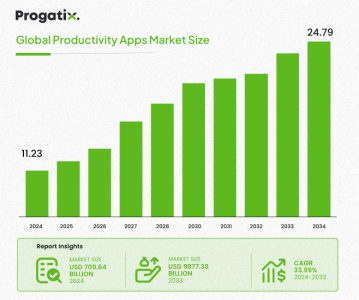
In this blog, the productivity apps are categorized based on their key functions and use cases. Here’s how they fit into each category:
Task & Project Management
Task and project management tools are significant for organizing work, arranging tasks, and ensuring timely project delivery, whether solo or in a team. These apps streamline complex projects into practicable tasks, set deadlines, track progress, and improve collaboration. Not only do these apps simplify workflows and boost productivity by keeping everyone aligned.
Here are a few of the best task and project management apps:
-
Todoist: Best for Effective Task Organization
Todoist is an effortless yet potent task manager made to help you stay on top of your daily tasks and ongoing projects. With a simple interface and user-friendly design, it is the right choice for anyone looking to stay organized in both work and personal life.
Pros of Using Todoist:
- Add tasks, allot due dates, and set priorities (Priority 1 to 4) for clear decision-making.
- It offers customizable organization by grouping tasks with labels and filters to keep everything organized.
- It allows switching between a simple checklist view and a board view in the Kanban style to better arrange tasks based on their importance.
- Organize activities into subtasks for detailed tracking, and set reminders to ensure nothing important gets overlooked.
- The app’s intuitive design emphasizes what matters most, that is, your tasks, by making navigation simple and effective.
Cons of Using Todoist:
- The free plan limits you to just five personal projects, which could be restricting as your tasks develop.
- Some users might find the interface a bit basic, with restricted customization selections.
- Calendar view and custom reminders are only accessible in the paid version, limiting functionality for free users.
What’s New in Todoist?
- Premium users can now sync Todoist tasks directly with Google Calendar, offering an integrated view of tasks and meetings.
Available for: Linux, Mac, Windows, Web, iOS, and Android
Pricing: Free plan available; Paid plans start at $4/month (billed annually)
Todoist is known for its ease and trustworthiness, making it a leading choice for those requiring an effective and easy-to-use task manager. It can be beneficial, especially for personal productivity, with its paid version revealing more advanced features that make it even more flexible for managing both professional and personal tasks.
-
Trello: Best for Visual Task and Project Management
Trello is a well-known workflow management tool for visual task and project management, as well as collaborating with colleagues. Its user-friendly interface helps streamline project organization. It distributes all the tasks into various teams or groups, and smaller jobs could be listed on “cards” before being organized on “boards.” It allows you to even create comments or set a deadline, helping in tracking progress.
Pros of Using Trello:
- It offers Kanban boards for visual task tracking, showing what’s pending, in progress, or done.
- Customize boards for different projects, add lists, and move cards to envision workflows clearly and intuitively.
- Add team members to boards, assign tasks, and easily share files and comments, ensuring smooth collaboration.
- Set deadlines on tasks and obtain reminders to ensure timely completion.
- Boost functionality with integrations such as Slack, Google Drive, and more, as well as Power-Ups for additional features such as calendar views.
Cons of Using Trello:
- Limited Free Features: The free version has a restricted number of Power-Ups (one per board), which can be limited for more complex requirements.
- Overwhelming for Large Projects: As projects grow in size, handling tasks across numerous boards can become disorganized and challenging to navigate.
- Basic Features for Premium Users: Advanced features such as custom fields and timeline views are only accessible in the paid versions, restricting some functionality for free users.
What’s New in Trello?
- Premium users now have access to advanced project views, such as timeline and dashboard views, offering improved insights into project progress.
Available for: Web, Mac, Windows, iOS, Android
Pricing: Free plan available; Paid plans start at $5 per user/month (billed annually)
Trello is renowned for its visual approach to task and project management, making it a leading selection for those who prosper in an adaptable, easy-to-use setting. While its free plan is exceptional for basic task tracking, the paid versions provide more advanced features right for larger teams and more complex projects.
-
ClickUp: Best for All-in-One Task and Project Management
ClickUp is an all-in-one productivity platform that combines task management, document collaboration, goal setting, and time tracking. With comprehensive customization options and robust automation features, it adjusts according to your requirements, whether for individual or team use. Its user-friendly interface ensures easy onboarding and smooth integration with other tools, making it an adaptable and effective solution for managing both simple and complex workflows.
Pros of Using ClickUp:
- Add tasks, set priorities, assign due dates, and divide tasks into subtasks for comprehensive tracking.
- Choose from list, board (Kanban), Gantt, and calendar views to manage tasks in the way that works best for you.
- Create workflows tailored to your team’s requirements with custom fields, statuses, and templates.
- Share tasks, leave comments, upload attachments, and engage with team members right away within the platform.
- Measure productivity easily by keeping track of the duration of time spent on tasks using the built-in time tracking feature.
- Integrate with over 1000+ apps such as Slack, Google Drive, and Trello, and automate tedious tasks to save time.
Cons of Using ClickUp:
- Due to its wide collection of features, new users might find the interface overpowering at first.
- While the free plan provides a lot, certain advanced features, such as timelines and goals, are only accessible in the paid versions.
- Some users report infrequent performance lag when dealing with bigger projects or data sets.
What’s New in ClickUp:
- ClickUp has lately introduced advanced reporting features, enabling users to track productivity and project progress with more comprehensive insights.
- Improved integrations with third-party apps for improved synchronization across tools.
Available for: Web, Mac, Windows, iOS, Android
Pricing: Free plan available; Paid plans start at $5 per user/month (billed annually)
Turn Your Favorite ClickUp Features into a Personalized App
Let's Connect
-
Asana: Best for Setting Goals and Reporting
Asana is a productivity app built to help teams handle tasks, track progress, and engage effectively. It’s perfect for both small businesses and large organizations, available on the Web, macOS, Windows, Linux, iOS, and Android.
Pros of Using Asana:
- Task Management & Collaboration: Easily add tasks, assign them, and set deadlines for smooth collaboration.
- Choose from multiple views like List, Board, or Calendar views to organize tasks.
- It manages numerous projects and tracks goals with portfolios and development overviews.
- Its AI features align tasks with company goals and offer recommendations to enhance performance.
- In paid plans, get reporting related to track completed, incomplete, and overdue tasks.
Cons of Using Asana:
- Pricing: Beginning from $10.99/user/month, which could be a challenge for larger teams.
- Restricted Free Features: Advanced features such as automation, AI insights, and reporting are only available in paid plans.
What’s New in Asana?
- New AI tools for streamlining task management and making the team focus better.
Available For:
Web, macOS, Windows, Linux, iOS, Android
Pricing:
- Personal Plan: Free
- Starter Plan: $10.99/user/month (billed annually)
- Advanced Plan: $24.99/user/month (billed annually)
- Enterprise: Pricing on request
Scheduling & Calendar
Scheduling and calendar tools are fundamental for staying organized and meeting deadlines. They help by planning tasks, setting appointments, and engaging with team members to ensure decreased struggles and improved time management. With features such as automated reminders, real-time updates, and integration with other tools, these apps ensure improved alignment and effective workflow.
Here are a few of the top productivity apps built for scheduling and calendar management:
-
Google Calendar: Ideal for Tracking Appointments
Google Calendar is a user-friendly, free tool perfect for managing both virtual and in-person appointments. With it, you can effortlessly add events, adjust calendar views, schedule Google Meet conferences, and share your calendar. You can also build multiple calendars to disperse work and personal appointments, helping you spot free time.
Pros:
- Simple interface, available to anyone with a Google account
- Capability to add events, adjust views, and integrate Google Meet
- Option to create numerous calendars for improved organization
Cons:
- The interface has stayed mostly the same throughout the years
- Requires integration with other software for advanced features
What’s New in Google Calendar?
- The latest addition is a free scheduling feature to build a booking page.
Available For:
Web, Android, iOS
Pricing:
Free
-
Reclaim.ai: Best for Automated Calendar Management
Reclaim.AI is an intellectual calendar assistant built to streamline scheduling and automate time management. It’s perfect for busy experts who want to manage both repetitive events and daily tasks without continuous manual adjustments. Reclaim uses AI to automatically fill your calendar and preserve critical task time from interruptions.
Pros of Using Reclaim.AI:
- It manages repetitive meetings and tasks smoothly, ensuring reliability in your schedule.
- Its automatic rescheduling capability recognizes conflicts and rapidly adjusts your calendar to keep things running effortlessly.
- Syncs with task management apps to automatically integrate tasks to your calendar, saving time and decreasing scheduling problems.
- When a repetitive meeting is negated, Reclaim finds the ideal time to reschedule, ensuring the least disruption.
Cons of Using Reclaim.AI:
- Clunky task management features make direct task tracking within the app less effective and in need of improvement.
- It might take some time to completely integrate and automate your calendar with numerous apps and tasks.
What’s New in Reclaim.AI?
- New sync features and smarter scheduling options to optimize your calendar management.
Available For:
Web, iOS, Android
Pricing:
- Free Plan: 2 calendars, three habits, restricted integrations
- Paid Plans: Starting at $8/user/month for unlimited calendars, habits, and integrations
Communication & Collaboration
Communication and collaboration tools are important for smooth interaction within teams, ensuring smooth data flow and minimizing misunderstandings. They provide features such as real-time messaging, video conferencing, file sharing, and task management, making teamwork more effective and visible, whether in-person or remote.
Here are a few top productivity apps for communication and collaboration:
-
Slack: Best for Team Communication and Collaboration
Slack is a top communication and collaboration platform employed by businesses globally to simplify team interaction and productivity. It enables users to build channels for detailed projects or teams, ensuring structured conversations and easy collaboration. Slack supports smooth communication for both in-house and remote teams, providing voice and video calls, screen sharing, and file sharing, all in one app.
Pros of Using Slack:
- Get real-time communication by chatting with individuals or teams, both in private messages and public channels.
- Collaboration tools like share files, hold voice/video calls, and work together on projects without swapping apps.
- It offers cross-platform accessibility across devices like macOS, Windows, Linux, iOS, Android, and through a web app or browser extension.
- It’s great for remote teams, as it allows fluid communication and collaboration throughout time zones.
- It engages with wide-ranging third-party apps to integrate workflow and productivity.
Cons of Using Slack:
- With recurrent notifications, Slack can oftentimes overpower smaller teams, specifically.
- While the free version has limited features, advanced features like more integrations and file history are accessible only on paid plans.
What’s New in Slack?
- Constant updates to enhance user experience, including improved video conferencing features and better task management tools.
Available For:
macOS, Windows, Linux, iOS, Android, Web app, Browser extension
Pricing:
- Free Plan: Available with significant features
- Paid Plans: Start at $6.67/user/month (billed annually) for more advanced features and maximized support.
Slack is an excellent choice for teams of any size looking to enhance collaboration, streamline communication, and improve overall productivity. Whether you’re a small team or a large enterprise, Slack’s flexible tools and integrations can be tailored to your needs.
Create a Slack Style App With Us
Let's Connect-
Chanty: Slack alternative with built-in task manager for Team Communication
Chanty, known as the best Slack alternative, is a user-friendly team collaboration app built to streamline communication while providing built-in task management tools. Being perfect for small to mid-sized teams, Chanty allows you to chat, share files, conduct video/audio calls, and manage tasks, all within a clean, intuitive interface. With unrestricted messaging history, basic Kanban boards, and the ability to change messages into tasks, it provides a smooth blend of communication and productivity.
Pros of Using Chanty
- It enables easy one-on-one or group messaging with @mentions, threads, voice messages, and searchable history.
- Host audio/video calls with more than 1,000 participants, including screen sharing and presentation support.
- Built-in task management lets you turn messages into tasks, set priorities and due dates, and track them via list or Kanban view.
- It provides invite-only access, 2FA, AES-128 encryption with forward privacy, and GDPR compliance.
- Code snippet sharing is supported via a built-in editor with over 55 programming languages, perfect for dev teams.
Cons of Using Chanty
- It lacks basic task tools like Gantt charts or custom workflows.
- It has limited integrations with only 21 native integrations; it depends on Zapier for wider compatibility.
- With no live chat or phone support, it offers restricted help ranging from email tickets to a small knowledge base.
- Occasional video glitches cause interruptions or failed loading during calls, as reported by some users.
What’s New in Chanty?
- Enhancements in video conferencing stability.
- Quicker file uploads and UI developments for task tracking.
- More integrations under development upon user request.
Available For
macOS, Windows, iOS, Android, Web app
Pricing
- Free Plan: Unlimited messaging, audio/video calls, and task management (for up to 5 members).
- Paid Plan: Begins at $3/user/month (billed annually) for additional storage, infinite integrations, and guest access.
Chanty is ideal for teams looking for a lightweight, reasonable communication tool with simple task tracking. While it might not have the profundity of project management or integration flexibility that some greater platforms offer, its ease and pricing make it a robust selection for startups and remote teams considering effective internal collaboration.
Workflow & Utilities
Workflow and utilities play an important role in maximizing productivity by automating routine tasks, simplifying operations, and enhancing overall efficiency. They make sure that different parts of a project or daily routine connect smoothly, reducing delays and manual effort. From setting up triggers and reminders to incorporating several platforms and managing repeating actions, workflow utilities decrease the mental load and allow users to focus on what matters most. These behind-the-scenes tools are crucial to maintaining reliability, productivity, and structure in both personal and professional workflows.
Here are a few top productivity apps for Workflow and Utilities:
-
Raycast: Spotlight Alternative Supercharged for Productivity and Developers
Raycast is a blazing-fast productivity launcher for macOS that improves and replaces Spotlight with potent, customizable features. Built for individuals and teams, it goes beyond app launching by delivering built-in tools like task and window management, AI chat, clipboard history, code snippet sharing, and third-party integrations. With a keyboard-first approach and a minimal interface, Raycast helps users simplify workflows and perform complex actions in seconds, while keeping their hands on the keyboard.
Pros of Using Raycast
- Launch apps, files, and websites instantly with a quick keyboard shortcut.
- Use built-in tools like clipboard manager, calculator, window manager, timers, notes, calendar, and quicklinks.
- Supports code snippet sharing with syntax underlining for 55+ programming languages.
- Powerful AI integration helps automate tasks, generate content, and access intelligent search and chat.
- Easily range functionality with thousands of community extensions (e.g., Notion, Jira, GitHub, Spotify).
- Enables custom scripts, hotkeys, and workflows for power users and developers.
Cons of Using Raycast
- Currently restricted to macOS (Windows version in beta; no Linux support).
- Steep learning curve for users unfamiliar with keyboard-first tools or command palettes.
- AI and team features need a Pro plan, which may not suit casual users.
- Not a perfect full project management or communication tool, and focuses more on personal productivity instead.
What’s New in Raycast?
- Launched Raycast for iOS with AI, notes, snippets, and quicklinks.
- Extended Pro features with cloud sync, shared team tools, and faster AI responses.
- Regular updates with community-built extensions and new native integrations.
Available For
macOS (full), iOS (limited), Windows (beta)
Pricing
- Free Plan: Access to core launcher, clipboard, extensions, snippets, and community tools.
- Pro Plan: $8/user/month (billed annually) for AI tools, syncing, and team collaboration features.
Raycast is perfect for developers, designers, and productivity-focused individuals who want to streamline their workflows, replace multiple utility apps, and automate daily tasks. While it isn’t a communication platform like Slack or Chanty, its speed, extensibility, and minimal design make it a must-have tool for Mac power users.
-
IFTTT: No-Code Automation Platform for Home, Work, and Everything in Between
IFTTT (short for “If This, Then That”) is a potent no-code automation platform that engages over 900 apps, devices, and services to work better together. Available on Web and mobile, IFTTT allows individuals and businesses to create smooth workflows, called Applets, that trigger actions based on precise conditions. Whether you’re automating social media posts, establishing leads, managing smart home devices, or syncing data between tools such as Google Sheets, Slack, and Dropbox, IFTTT saves time and boosts productivity without writing a single line of code.
Pros of Using IFTTT
- Connects with 900+ services including social media, smart home devices, CRMs, calendars, and cloud storage.
- Supports custom automations with filters, queries, multi-step actions, and multiple account connections.
- Easy-to-use interface on iOS and Android enables you to automate on the go.
- Access a huge library of community-shared Applets or build your own from scratch.
- Improve content creation workflows using IFTTT’s AI-powered content generation tools.
- Cross-post content automatically throughout multiple platforms from one source.
Cons of Using IFTTT
- Some advanced features (multi-action, filter code, and AI tools) are limited to only the Pro plan.
- Restricted customization compared to full-scale automation platforms like Zapier.
- Occasional delays in automation triggers due to third-party API constraints.
- The user interface can feel overpowering for beginners with no automation experience.
What’s New in IFTTT?
- Write blogs and social content effortlessly using the upgraded AI Content Creator.
- Better app interface for mobile automation and quicker Applet creation.
- New integrations with popular CRMs, smart devices, and productivity tools.
Available For
Web, iOS, Android
Pricing
- Free Plan: Basic Applets with limited runs per month.
- Pro Plan: Starts at $2.50/month (billed annually) for unlimited Applets, multi-step automation, filters, and AI tools.
IFTTT is perfect for individuals, marketers, small businesses, and smart home users looking to connect and automate multiple services easily. Its huge integration network, user-friendly setup, and low entry cost make it a go-to choice for anyone wanting to simplify daily practices or business workflows, without touching a line of code.
Email & Inbox Management
Email and inbox management tools assist users stay on top of their communications by unifying, prioritizing, and simplifying email flow. These tools lessen clutter, highlight essential messages, and often incorporate features such as, smart filters, scheduling, and automated replies. By managing email more effectively, users can save time, ease stress, and keep better emphasizes across their workday.
Here are a few top productivity apps for Email & Inbox Management:
-
Clean Email: Smart Email Management that Restores Order to your Email
Clean Email is a powerful inbox management app built to declutter, organize, and automate your email cleaning tasks. Whether your mailbox is filled with years of unread messages or you’re only tired of uninvited subscriptions, Clean Email allows you to take control of your inbox with smart bundles, automation, and privacy-first tools. It works throughout all major email providers (like Gmail, Yahoo, and Outlook) and devices, simplifying your inbox anywhere, anytime.
Pros of Using Clean Email
- Organizes emails into smart folders and bundles such as “Old Emails,” “Social Updates,” and “Top Senders” for fast bulk cleaning.
- Features such as Unsubscriber, Mute, Read Later, and Auto Clean reduce manual work.
- Automatically collect, move, or delete emails using tailored Auto Clean rules.
- Works with all email services and apps, including Gmail, Outlook, Yahoo, AOL, and more.
- Prioritizes user privacy, never stores complete emails or shares data with third parties.
- Accessible across Web, desktop, and mobile platforms for easy access anywhere.
Cons of Using Clean Email
- Some features need a premium plan, which may not appeal to occasional users.
- Doesn’t include complete email functionality; it’s built precisely for cleaning and organizing, not sending or writing emails.
- It can take time for first-time users to organize filters and Auto Clean rules exceptionally.
What’s New in Clean Email?
- Introduced Quick Clean and Keep Newest for even quicker inbox management.
- Better Smart Folders to better group by sender, age, or category.
- Extended support for school and enterprise accounts with improved security features.
- Performance developments for quicker cleaning and automation syncing.
Available For
iOS, Android, Web, macOS, Windows(Works with all major email services)
Pricing
- Free Plan: Limited access to email cleaning features with limitations on actions each day.
- Premium Plan: Starts at $9.99/month or lower with annual billing; unlocks complete access to features such as Auto Clean, Unsubscriber, and unlimited actions.
Who Should Use Clean Email?
Clean Email is right for anyone looking to reach Inbox Zero, reduce stress from email overload, or automate tedious inbox cleaning. It’s specifically valuable for professionals, students, and individuals handling multiple email accounts. With a robust stress on safety and ease, it’s a smart solution for those who want their inbox under control, without giving up their privacy.
Time Tracking & Productivity
Time tracking and productivity tools help users understand how they spend their time and find opportunities for improvement. These tools enable users to track daily activities, set timers, and create detailed reports. Whether it’s about handling personal to-do lists or logging billable hours for clients, time tracking apps deliver valuable insights that support better planning and enhance overall efficiency.
-
Toggl Track: Simple and free time-tracker with reporting
Toggl Track is a simple yet powerful time tracking app that tracks time for individuals and teams. It helps freelancers, contractors, and small teams specifically by enabling them to track time with a single click, generate reports, and enhance productivity without disrupting their workflow. Whether you’re logging billable hours or recognizing distractions, Toggl makes it easier with its intuitive design and platform-wide support.
Pros of Using Toggl Track
- Start/stop timer, manual entry, and offline tracking options.
- Accessible across all major platforms, including desktop, mobile, Web, and browser extensions.
- For smarter time management, pomodoro timer, calendar view, and thorough reporting features are available.
- Tagging, descriptions, and project categorization for scheduled entries.
- Integrates with tools like Google Calendar, Zapier, and project management software.
- Keeps time data for more than 6 months even after inactivity.
Cons of Using Toggl Track
- Advanced features like billable rates, reporting, and project dashboards require a paid plan.
- Not perfect for time blocking or proactive planning; instead, it emphasises retroactive tracking.
- Doesn’t support GPS or location tracking, limiting usability for mobile or field-based work.
- Free plan is great for individuals, but restricted for providing collaboration tools for team growth.
What’s New in Toggl Track?
- Introduced passive time logging via its Chrome extension using automatic tracking
- Better dashboard visuals and report customization
- Expanded integration support with apps including Trello, Asana, and Notion
Available For
Windows, macOS, Linux, Web, iOS, Android, Chrome/Firefox extensions
Pricing
- Free Plan: Up to 5 users with access to basic time tracking and reporting
- Starter Plan: $9/user/month (billed annually) for billable rates, time rounding, and enhanced features
- Premium plans are accessible for bigger teams with advanced project tracking requirements
Toggl Track is a preferred choice for freelancers, consultants, and productivity-driven users who want a simplified, distraction-free way for their time tracking. With an extensive free trial and innovative automation features, it’s a great companion software for time transparency and efficiency even though it’s not a full-featured project management suite.
Start Developing a Smart Tracker App
Let's Connect-
Clockify: Free, multi-device time tracking with smart reports
Clockify is a popular time tracking and productivity app designed for individuals, freelancers, and teams to monitor work hours, optimize time usage, and generate detailed reports. With features such as manual time entry, an automatic tracker, billable hours logging, and calendar blocking, Clockify backs up both structured routines and dynamic workflows. It’s especially efficient for freelancers and businesses handling numerous clients or projects, offering adaptability across platforms.
Pros of Using Clockify
- Effortlessly track time with manual entries or start/stop timers for task-based logging, ideal for both structured and shifting daily routines.
- Supports billable hours tracking and invoicing, making it an exceptional solution for freelancers and contractors.
- Automatic tracker monitors time spent on apps and websites without manual input.
- Calendar view allows users to block out focus time, assisting in lessening distractions and structuring deep work.
- Integrates smoothly with other productivity tools like Trello, Asana, Jira, Todoist, and more.
- Works throughout platforms including browser extensions, mobile apps, and desktop software.
- The dashboard offers a clear visual breakdown of time spent, making it easy to analyze productivity patterns.
- Engages with Pumble and Plaky for integrated communication and project collaboration.
Cons of Using Clockify
- Advanced features such as time-off management, team reminders, and adding time on behalf of others are restricted to paid plans.
- Perfect for teams or businesses, individual freelancers might find some tools underutilized.
- Lacks built-in GPS or location tracking, a limitation especially for mobile experts.
What’s New in Clockify?
- Users can now view billable amounts and internal costs directly in the Schedule view.
- Team Schedules now support creating assignments, enhancing planning, and accountability.
- Item-based tax settings announced for more thorough invoicing.
Available For
Web, macOS, Windows, Linux, iOS, Android
Pricing
- Free Plan: Limitless tracking for individuals or small teams with basic features.
- Standard: $5.49/user/month (billed annually), adds timesheet reminders and break tracking.
- Pro: $7.99/user/month, includes scheduling, budgets, and productivity targets.
- Enterprise: $11.99/user/month, offers advanced control, custom fields, and audit logs.
Clockify is a versatile and intuitive app that streamlines time tracking without overpowering users. With both free and affordable paid tiers, it supports lone professionals and developing teams similarly. It is a great alternative for those who want to take control of their time and improve daily productivity, given its simple design, auto-tracking features, and robust integration capabilities.
-
Focus To-Do: Pomodoro-Based Time and Task Management
Focus To-Do is a lightweight productivity app that blends task management with the Pomodoro Technique to help users stay focused and effectively finish work. With millions of users globally, it’s best for people who want to keep on top of daily tasks, manage their time better, and reduce procrastination. The app allows users to log time, create to-do lists, set reminders, and analyze productivity trends through integrated reports. Whether you’re handling work, study, or life errands, Focus To-Do brings structure to your day with its clean interface and interruption-free timers.
Pros of Using Focus To-Do
- Based on the Pomodoro Technique to improve focus and eradicate multitasking via structured time blocks.
- Supports to-do lists, subtasks, due dates, and repeating tasks to handle all types of work and personal goals.
- Offers thorough productivity reports demonstrating daily/weekly/monthly time usage and task completion rates.
- Offers reminders and notes to ensure nothing is unused and all details stay in one place.
- Cloud sync enables smooth access across mobile, desktop, and browser extensions for real-time tracking anywhere.
Cons of Using Focus To-Do
- Restricted collaboration features; better suited for solo users rather than teams.
- No native integrations with popular productivity or calendar tools.
- UI, while clean, might feel excessively simplistic for power users looking for customization or complex workflows.
- Premium features such as historical stats and advanced reporting need a subscription.
What’s New in Focus To-Do?
- Enhanced syncing between devices for a smoother cross-platform experience.
- New detailed analytics included to better understand time distribution and task habits.
- UI improvements for task categorization and Pomodoro session history.
Available For
Windows, macOS, Android, iOS, Web, Chrome extension
Pricing
- Free Plan: Core Pomodoro timer, basic task management, reminders, and syncing across two devices.
- Premium Plan: Starts at $2.99/month for unlimited devices, full report history, and advanced productivity insights.
Focus To-Do app is an ideal choice for students, freelancers, and anyone looking for a distraction-free productivity system. While it might not replace full project management suites, its focused design and Pomodoro-based rhythm make it a reliable tool for building consistency and defeating procrastination.
Notes and Writing
Notes and writing play a crucial role in productivity as they involve gathering ideas, organizing thoughts, and documenting crucial details. Whether it’s about jotting down meeting notes, drafting content, or creating structured outlines, notes and writing help users in staying organized and keeping critical details. With features like cloud sync, tagging, and collaborative editing, note-taking tools make it easy to access and share information anytime, anywhere, improving both personal productivity and team efficiency.
-
Notion: Best all-in-one workspace for note-taking and project organization
Notion is an adaptable productivity platform that combines notes, documents, databases, and task management into a single, potent workspace. It simplifies your digital life by integrating all of your tools into a single, user-friendly system, including wikis, budget trackers, meeting notes, and to-do lists, which makes it perfect for both individuals and groups, Whether you’re managing personal goals or collaborating on projects, Notion adjusts to your workflow via a clean interface and highly personalized templates.
Pros of Using Notion
- Uses a powerful block-based editor to create and organize notes, documents, and pages.
- Highly customizable templates for everything from mood tracking and project planning to finance and health logs.
- Embed videos, files, databases, and more, alongside hyperlinks to other pages for quick cross-referencing.
- The new AI assistant helps automate workflows, generate content, and draw insights from your data.
- Integrates with tools such as Google Drive, Trello, Slack, and more for smooth productivity.
Cons of Using Notion
- Steep learning curve for new users, particularly when building complex setups.
- Mobile app performance is less smooth compared to the desktop version and is prone to rare crashes.
- Limited users and file access on lower-tier plans, limiting larger teams.
- Paid plans are comparatively costly compared to simpler productivity apps.
What’s New in Notion?
- Introduced automation for Gmail notifications and extended AI capabilities for better workflow management.
- Introduced the Notion Marketplace, enabling users to buy and sell custom templates.
- New templates released for common use cases such as meetings, brainstorming, and task tracking.
Available For
macOS, Windows, Web, iOS, Android
Pricing
- Free Plan: Personal use with basic blocks, sharing, and restricted integrations.
- Plus Plan: $10/user/month (billed annually) for limitless pages, guests, and version history.
- Business Plan: $15/user/month (billed annually) with team collaboration tools and admin controls.
- Enterprise: Custom pricing for advanced security, SAML SSO, and user provisioning.
Notion is the right choice for freelancers, creatives, students, and teams who want to centralize their productivity tools in one smart workspace. With incomparable flexibility and constant updates, it remains one of the best all-in-one platforms for maintaining both work and life.
-
Apple Notes: Best Free Note-Taking App for Apple Users
Apple Notes is a free, native note-taking app built into all Apple devices, designed to help users jot down, organize, and sync their thoughts seamlessly across iPhone, iPad, and Mac. With an intuitive interface, Apple Notes is perfect for quick note-taking, checklists, journaling, or even long-form content, particularly for those embedded in the Apple ecosystem. Over the years, it has evolved from a basic app to a fully capable productivity tool supporting folders, smart tags, multimedia, and iCloud sync.
Pros of Using Apple Notes
- Completely free and pre-installed on iOS and macOS with no setup required.
- Seamless syncing via iCloud allows access to notes across iPhone, iPad, Mac, and Web (via iCloud.com).
- Supports checklists, attachments, scanned documents, handwritten notes, and tags for advanced organization.
- Smart Folder feature auto-organizes notes based on tags and filters.
- Quick Notes allow users to capture snippets or thoughts instantly from any screen (Mac/iPad).
Cons of Using Apple Notes
- No native Android or Windows app, making cross-platform accessibility difficult.
- Limited customization or integrations compared to third-party productivity apps.
- The web version (via iCloud) has fewer features and can feel clunky on non-Apple devices.
What’s New in Apple Notes?
- Introduction of Smart Folders and tagging system for automated note sorting.
- Quick Notes feature lets users jot down floating notes from Safari or any app.
- Enhanced collaboration tools for shared note editing and mentions.
Available For
macOS, iOS, iPadOS, Web (via iCloud.com)
Pricing
- Free Plan: Up to 5GB of iCloud storage (shared across all Apple services)
- Paid Plans: iCloud+ starts at $0.99/month for 50GB, expanding storage and privacy features
A simple yet powerful tool, Apple Notes is perfect for anyone dedicated to the Apple ecosystem. With zero cost, solid syncing, and recurrent updates, it helps students, professionals, or creatives who want fast access to planned thoughts across devices. While its lack of Android/Windows support might restrict broader use, Apple Notes remains a trustworthy choice for Apple users looking for an easy note-taking solution.
Conclusion
By simplifying workflows, improving time management, and facilitating seamless, problem-free collaboration, productivity technologies empower both individuals and teams. Among the advanced options that these productivity applications offer to cut down on distractions and enhance workflows are calendar scheduling, team communication, time monitoring, and task management.Whether you’re a freelancer, a student, or part of a developing business, using the right mix of free productivity apps can radically improve your focus, responsibility, and output. Choosing productivity apps that align with your goals and work style is key to unlocking your full potential.
How Progatix Can Help?
If off-the-shelf software just doesn’t cut it, Progatix is here to help. We build next-gen custom software and custom mobile apps tailored to what your business truly needs, nothing generic, everything with purpose.
With years of experience and global trust, we’ve helped businesses build smart, scalable solutions that make work easier and customer experiences better. Whether you’re a startup launching your first product or a big enterprise looking to upgrade old systems, Progatix works closely with you to build digital solutions that drive growth, spark innovation, and stand the test of time.
Build a Custom Productivity App to Streamline Your Workflow
Let's Connect


 Let's Discuss Your Tech Solutions