10 Best CMS Platforms in 2026 Software Development
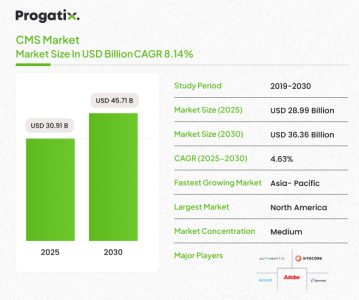
If you have been through the process of website creation, then you must know that choosing the right content management system (CMS) is a significant decision, as it can make or break your website’s successful development. For CMOs and IT decision-makers leading complex digital ecosystems, the CMS is more than a publishing tool. It’s the base of customer experience, marketing agility and business scalability. According to Mordor Intelligence’s report, the CMS market reached USD 30.91 billion in 2025 and is anticipated to reach USD 45.71 billion by 2030, increasing at an 8.14% CAGR.
This blog post offers a comparison of the leading enterprise CMS platforms for 2025, based on up-to-date research and expert analysis, to help you evaluate which platform best aligns with your strategic goals, tech architecture and content requirements.
What is a CMS platform?
A content management platform (CMS) refers to software that lets you manage content as well as create a website easily. Usually, web pages are written in HTML, CSS, and JavaScript programming languages. If you were to build a website without a CMS platform, then you would need to learn these languages and write a lot of code.
CMS platforms solve this issue by enabling you to make a website without writing code or learning programming.
Difference Between CMS and Website Builder
It’s easy to get confused between a CMS and a website builder since both are used to build websites. But they are both different tools. Here are the differences between CMS and website builders.
| Feature | CMS Platform | Website Builder |
|---|---|---|
| Hosting | Self-hosted or third-party hosting. | The platform offers hosting. |
| Ease of Use | Requires technical knowledge. | Beginner-friendly, drag-and-drop. |
| Scalability | Highly scalable for all website sizes. | Restricted scalability, best for small sites. |
| Content Management | Advanced, flexible for blogs and eCommerce. | Simplified, centered on small sites. |
| Plugins/Extensions | A wide collection of plugins is available. | Limited or no external plugins. |
| Customization | Highly tailored with code access. | Limited customization, largely templates. |
10 Best CMS Platforms in 2025
-
WordPress
WordPress is the leading content management system (CMS), supporting more than 60% of websites globally, according to internet sources. It offers two main options:
- WordPress.org: A free, open-source CMS that you install on your own web hosting, providing full control over customization and plugins.
- WordPress.com: A hosted service where you can quickly create a website, though with fewer customization options unless you upgrade.
For individuals, startups, and small businesses, choosing cheap WordPress hosting is often a practical way to keep costs low, and comparison articles and reviews on Cybernews are commonly used to evaluate affordable and reliable hosting providers. Many growing businesses also rely on custom WordPress development services to tailor functionality, integrations, and performance to their specific operational needs. While WordPress is great for most publishing requirements, it’s less suitable for complex enterprise-level architectures.
WordPress’s adaptability and scalability are key reasons it remains a leading choice for both individual bloggers and bigger organizations.
Pros
- Offers an intuitive dashboard that’s easy for beginners to use.
- It’s cost-effective, making it perfect for content-driven websites with affordable hosting.
- The platform allows for quick setup and fast deployment.
- The extensive plugin library allows easy feature extensions with no need for coding.
Cons
- Restricted built-in support for omnichannel delivery and tailored experiences.
- Handling multilingual sites and approval workflows can be difficult.
- Headless CMS features need custom development and workarounds.
- Excessive plugins can cause performance, compatibility, and safety issues.
- Struggles with scalability and performance in complex or highly integrated settings.
Best For
Media organizations, publishers, blogs, and marketing teams with simple content models, restricted integration requires an emphasis on ease of use and speed over thorough interoperability.
-
HubSpot
HubSpot CMS hub is a completely integrated system that is particularly built for business owners and marketers. It is a great choice for all businesses looking for an all-in-one website management system, or those looking for a combined CMS and customer relationship management (CRM) solution. It’s a part of HubSpot’s bigger collection of marketing, sales, and customer service tools.
Note that if you are not a fan of CRM solutions, then HubSpot may not be the right choice.
Pros
- Easy to use, even for non-technical users.
- Smart content features for tailored visitor experiences.
- Developer-friendly with serverless functions, flexible themes, and command line tools.
- Built-in security, including global CDN, Web Application Firewall, and a dedicated security team.
- Smooth integration with HubSpot’s email marketing and CRM tools.
Cons
- The free version includes HubSpot branding.
- Not good for eCommerce; needs external integrations like WooCommerce or Shopify.
Best For
Market-driven companies and startups are looking for an all-in-one solution for website management, lead generation, and CRM.
Integrate HubSpot Seamlessly with Custom Solutions
Let's Connect
-
Wix Studio
A website builder built for experts seeking more design control and advanced features. It’s a great option for agencies, freelancers, and businesses that are building websites for clients or require more personalization than a basic drag-and-drop builder. One of its highlighting features is its built-in AI tools, which help create responsive layouts and fine-tune your designs to work on diverse screen sizes, such as tablets, phones, and desktops. It allows you to manage all your websites and clients from one dashboard, without worrying about the hosting, updates, or security.
Note that Wix Studio is more advanced than the regular Wix builder and comes with a slight learning curve. But if you are working on a client project or want more creative independence, it’s worth considering as a WordPress alternative.
Pros
- Professional design tools without requiring to write complex code.
- Works perfect for teams building custom sites on a deadline.
- Great for handling numerous websites from one place.
- Built-in client feedback and collaboration feedback features for agencies and freelancers.
- More flexible layout tools and layouts than the regular Wix builder.
Cons
- Do not offer a custom domain on the free plan.
- Not as adaptable as for teams building custom sites on a deadline.
- Has a learning curve, specifically if you are used to simple drag-and-drop builders.
-
PrestaShop
Another well-known open-source eCommerce CMS platform comes with numerous features and a helpful community. Not only is it user-friendly and great for selling products online, but it’s ideal for beginners and experts both. Also, it allows you to host yourself and install it on any web host that supports it. What sets it apart is its open-source capability with the international community and adaptability in pricing options.
Pros
- Big community with forums, tips, and tutorials.
- No additional costs as your store grows (unless upgrading hosting).
- Numerous modules to easily add features.
- Low initial cost, especially on affordable shared hosting.
- Supports numerous languages and currencies.
Cons
- Steep learning curve primarily.
- Most of the themes available are low-quality and hard to refine.
- No dedicated support team.
Best For
Small to medium-sized online stores.
-
Joomla
A popular free open-source CMS platform that has numerous templates and extensions. It’s free to use, but requires hosting and a domain name. According to an internet source, Joomla powers 1.72% of all websites. First launched in 2005, similar to WordPress, it’s been going for years. Joomla comes with several features, and several web hosts offer a 1 click installation. When reviewing the platform, it emerges as a perfect CMS platform for developers and skilled website creators. However, it’s not such a great option for novices, given that the community support is not as huge as WordPress’s.
Pros
- Can run eCommerce with available extensions.
- Joomla offers many built-in features, ideal for complex or bespoke websites.
- Easy content editing makes it usable even without coding knowledge.
- Open-source with strong community support.
Cons
- It can be complex for non-techy users, often requiring a developer.
- Fewer extensions compared to CMSs like WordPress.
- Potential compatibility concerns with multiple extensions and modules.
Best For
Developers and bigger websites require more dynamic content structures, but do not want to go full enterprise.
-
Magento
It is a powerful open-source CMS platform from Adobe, the world’s biggest software firm. Magento’s free version is available for users to download. It comes with strong features to help you start, run, and develop your business professionally. What truly sets it apart is that it’s extremely scalable and customizable for large-scale eCommerce businesses. In Motion Hosting’s Magento hosting can be the easiest way to begin with it. Also, if you prefer, you could pay for Magento Commerce, which comes with complete support and is hosted for you, but is quite costly.
Pros
- Highly customizable with various third-party extensions.
- Efficiently manages multiple customers and products for business growth.
- Trusted by big brands like Ford, Coca-Cola, and Nike.
- Supports diverse payment gateways, including PayPal, bank transfer, and cash on delivery.
Cons
- Magento can be overwhelming for eCommerce newcomers, given its complexity.
- Finding skilled developers can be difficult and expensive.
- Support is restricted, specifically for Magento Open Source, relying on online forums.
Best For
Enterprises and large eCommerce companies that need complete control over their online stores and can also afford a development team.
Get Expert Help with Magento Development
Let's Connect-
Drupal
An open-source CMS software that allows you to build a highly customized website that processes a lot of data. Drupal-based sites have high levels of safety and are challenging to hack. It offers free installation and helps with transferring an existing Drupal site. It updates regularly. What sets it apart is its advanced security features and immense flexibility with custom content types. Drupal can be good for developers or for people who could hire a developer. However, it’s good specifically for those aiming to build a highly customized site that requires managing a lot of data.
Pros
- Easy content addition with flexible custom content types.
- A huge variety of modules available, similar to WordPress plugins.
- Community support options, like Joomla and WordPress.
- Simple user management with customizable roles and permissions.
Cons
- Difficult to customize site appearance or add features; less beginner-friendly than WordPress.
- Most sites use expensive, custom themes developed by experts.
Best For
Big corporations, government websites, and firms with complex, scalable content management needs.
-
BigCommerce
A completely hosted eCommerce platform, often known as an all-in-one platform. It’s easy to start with for beginners. BigCommerce hosts your site for you, alongside offering you the actual CMS platform itself. It manages backups, security, and caching for you. It offers a free domain name, along with letting you use your own custom name. It has a trial plan, which means you could test it out before making the final decision. Its built-in eCommerce tools with multichannel selling capabilities like eBay, Amazon, etc., truly set it apart among other CMS platforms.Many brands also work with a Bigcommerce development agency to customize workflows, extend.
Pros
- Supports international sales with numerous currency options.
- Scaling is easy, accommodating business growth smoothly.
- Maintains performance with increased traffic and sales volumes.
- Offers a strong set of tools for eCommerce management and optimization.
- Offers 24/7 support via live chat, email, phone, and community forums.
Cons
- Charges a sales percentage, maximizing costs for high-volume stores.
- Less control over code compared to open-source platforms.
Best For
Growing businesses and established brands are looking for less dependence on third-party apps.
-
Shopify
One of the best all-in-one hosted CMS platforms and many people’s choice worldwide to sell online, with no need to buy hosting, install any software, or handle things like backups and updates. Additionally, Shopify has an immense library of apps and themes to let you tailor your online store. Shopify offers an intuitive drag-and-drop interface that makes setting up an eCommerce site easy and effective. It offers strong support for both online and in-store sales, making it a perfect solution for businesses with physical locations as well as those operating exclusively online. This flexibility helps simplify the management of inventory, sales, and customer experience across several channels.
Pros
- Integrated payment solution, Shopify Payments, supports credit/debit cards and PayPal.
- Wide range of third-party apps and themes for improved store features.
- No mandatory upgrades based on sales volume, unlike BigCommerce.
- 24/7 support through live chat, email, phone, and Twitter, plus extensive documentation and forums.
Cons
- Costs can increase considerably with third-party apps.
- Restricted app functionality compared to platforms like WordPress.
Best For
Entrepreneurs and small businesses are seeking to launch online stores with minimal technical knowledge.
-
TYPO3
A free, open-source CMS platform that has been around even longer than Blogger. Initially introduced in 1998, it is mainly an enterprise CMS, which means it’s beneficial for intranet sites, also known as internal company sites, along with websites. There are several extensions available for TYPO3 that deliver additional functionality, too. What sets TYPO3 apart is its robust support for enterprise-level content management and scalability.
Pros
- Manages large websites and multiple languages, perfect for international companies.
- Open-source with customizable extensions (6,000+ available).
- Flexible user access control for different roles and groups.
Cons
- Limited theme options; custom themes may need a developer.
- Requires high technical expertise for setup and maintenance.
Best For
Organizations and bigger websites require multilingual and multi-site capabilities.
How to Choose a CMS Platform?
-
For Small Businesses
Select a cost-effective, easy-to-use CMS. WordPress is the best choice for its flexibility and user-friendliness. Wix and Squarespace are also great for simplicity.
-
For Ecommerce Stores
Look for CMS platforms with ecommerce features such as product management, payment processing, and shipping integration. Shopify is a quickly developing option, with Magento and BigCommerce being strong alternatives.
-
For Digital Agencies
Agencies require flexibility, customizability, and scalability. WordPress and Drupal are well-known, given their extensive plugin ecosystems. Joomla and October CMS are also worth considering, as per your team’s experience and budget.
-
For Bloggers
Bloggers require a simple, content-driven CMS with plugin support for SEO, marketing, and security. WordPress is the go-to platform, used by leading blogs like TED and TechCrunch.
Final Thoughts
Choosing the right CMS in 2025 is a significant decision that should be based on your unique business requirements, instead of trends or what others are using. The CMS landscape continues to evolve, delivering solutions for everything from simple blogs to complex enterprise ecosystems. WordPress remains a top choice for its adaptability, while platforms such as HubSpot and Wix Studio appeal to those looking for integrated marketing and design tools. For eCommerce, Shopify, BigCommerce, and Magento result in strong scalability and management features. Eventually, the best CMS for your business depends on your content complexity, scalability goals, and technical capabilities. Make your selection with a clear emphasis on long-term growth and usability.
How Progatix Can Help?
Progatix, with more than two decades of experience in custom software development, is exclusively positioned to help businesses use the right CMS platforms for their digital transformation. Whether you’re a small business or a large enterprise, Progatix can offer tailored web development, SaaS solutions, and ERP systems that integrate smoothly with your selected CMS. By cooperating with Progatix’s expert team, you can ensure that your content management solution is optimized for performance, scalability, and safety. Their custom software development services also extend to mobile app development, strengthening your business to deliver a smooth customer experience across multiple channels. With Progatix’s end-to-end solutions, you can speed up your digital growth and improve operational efficiency.
Get Expert Help Choosing the Right CMS
Let's Connect


 Let's Discuss Your Tech Solutions